B2B campaign intelligence

From prospect research to the right next action.

Research prospects, build a repeatable campaign strategy, adapt messages to business and technology signals, and prioritize follow-up from clicks and replies—while keeping important decisions under human control.

Reviewable strategy · Human-approved drafts · Engagement signals in context

Discover the Chrome extension
Illustrative record
EM
Elena MartinOperations Director
Complete
OrganizationNorthstar Industrial Systems

Industrial automation · Lyon, France

Qualification signalStrong relevance

Public operational context aligns with the defined research criteria.

5 research sourcesPersonalized draft ready for review →

Presage in action

See the workflow come together.

Take a short tour of the core research and campaign workflow. The engagement features described below extend that foundation while keeping people in control.

A short introduction to Presage, with music.

Presage for Chrome

From a LinkedIn profile to a contact in Presage.

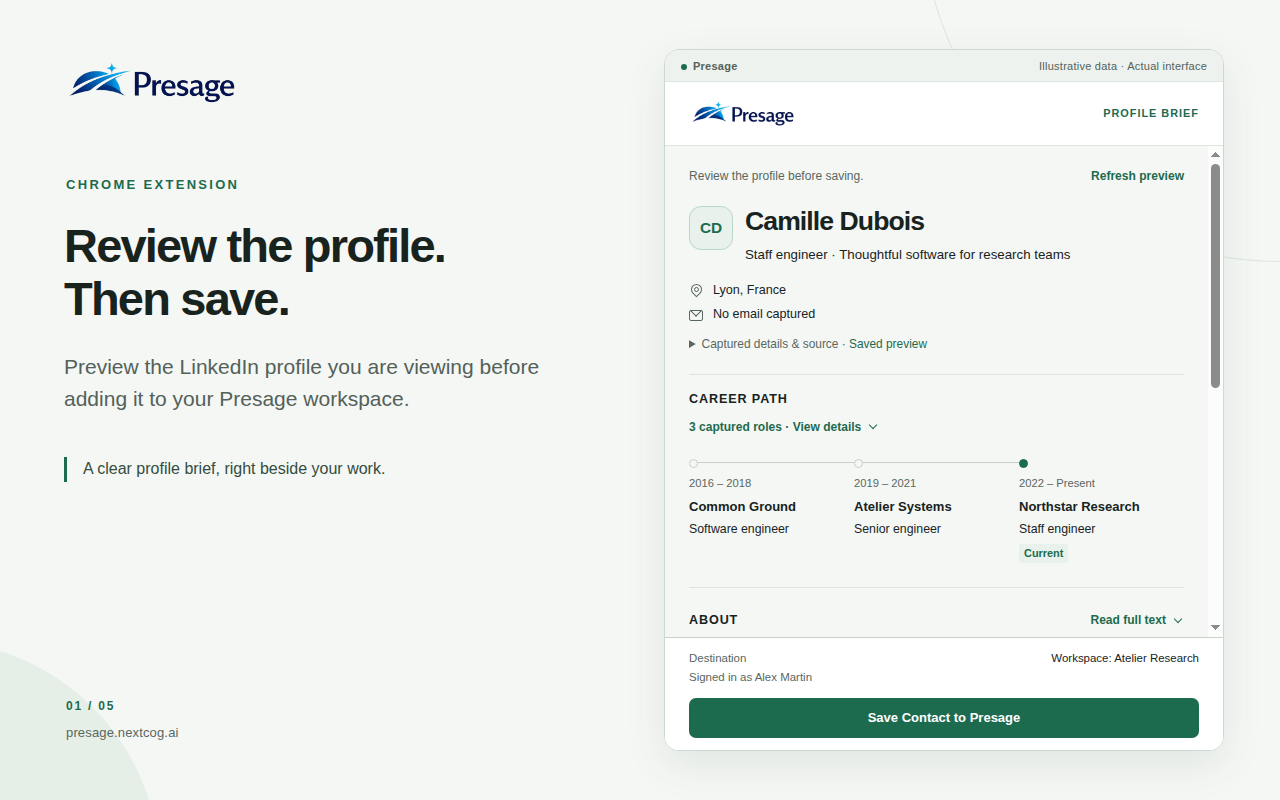
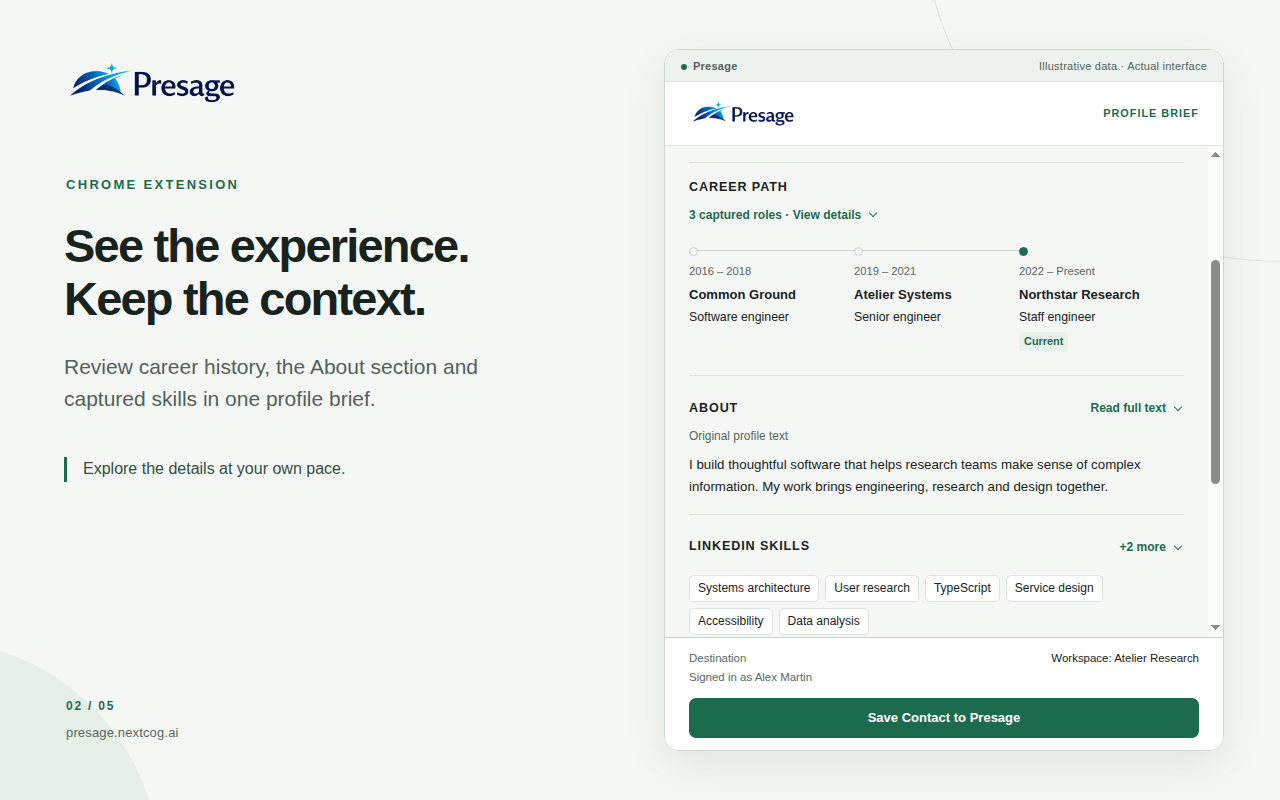
Turn the LinkedIn profile you are viewing into a contact in Presage, without copying fields one by one. Preview the available information in the sidebar, review it, then choose what to save or update.

Available in English and French, based on your browser language. You must also be signed in to LinkedIn in the same browser to preview profiles.

  1. 01

    Preview the profile

    See the headline, location, available contact details, career history, About text and skills. Explore up to three authored posts from the returned activity preview. Information LinkedIn does not provide stays unavailable.

  2. 02

    Review the details

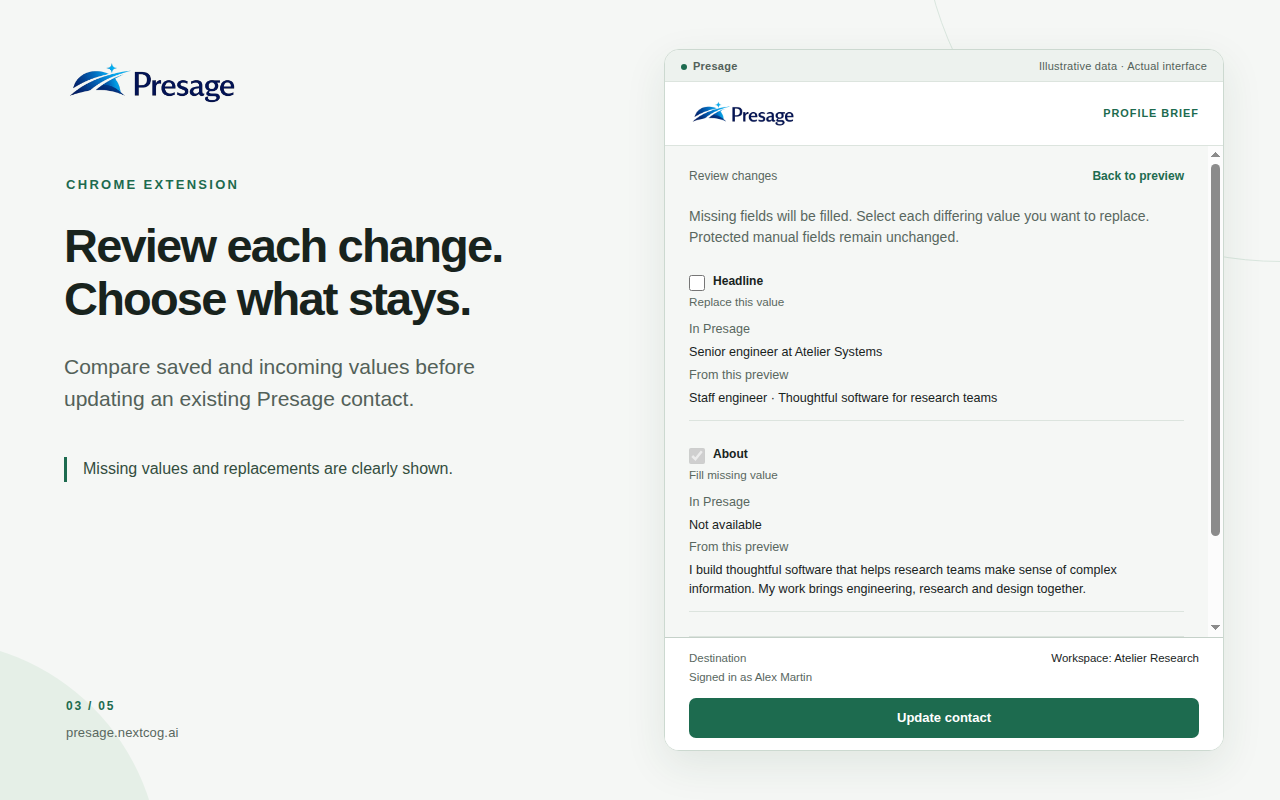
    Correct basic details before saving. If the profile already has a contact in your account, compare existing and incoming values and select which differing values to replace.

  3. 03

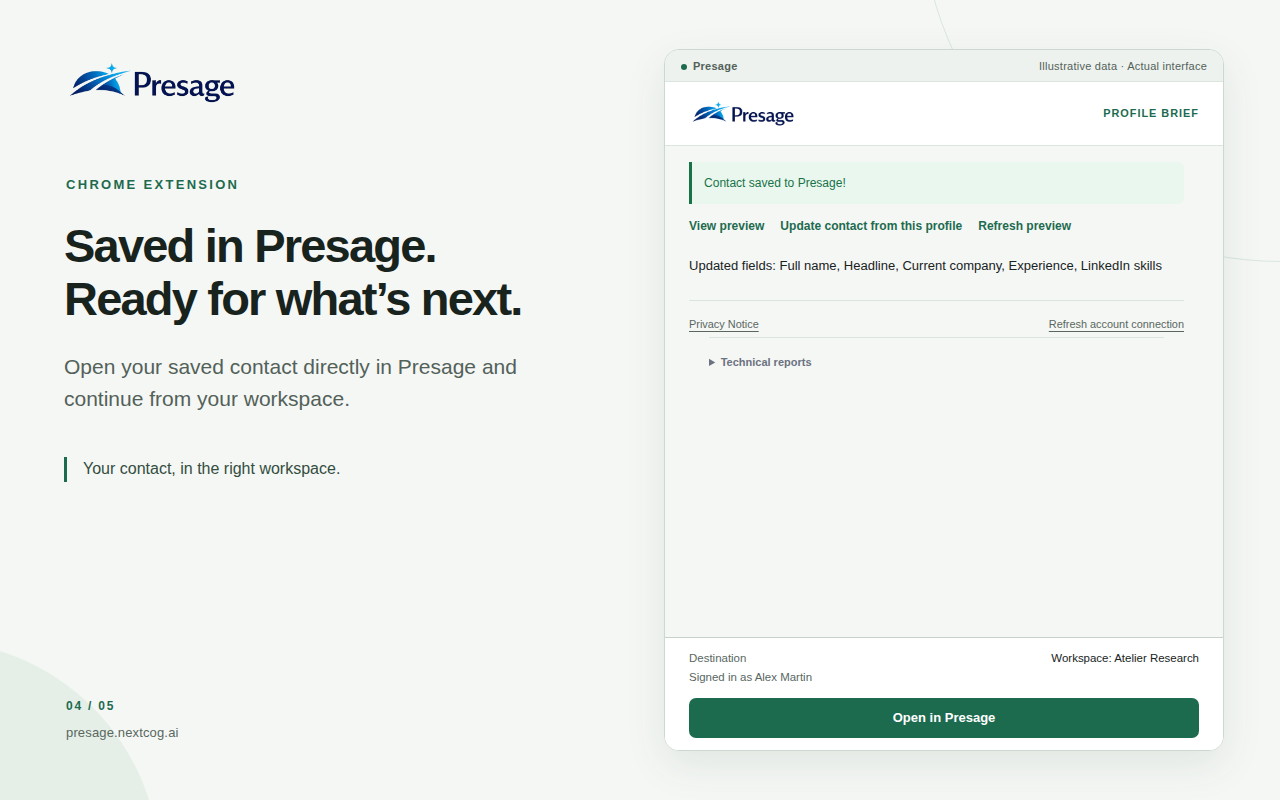
    Save or update

    Create a contact or confirm the selected updates, then open the saved record directly in Presage. Protected manual fields remain unchanged.

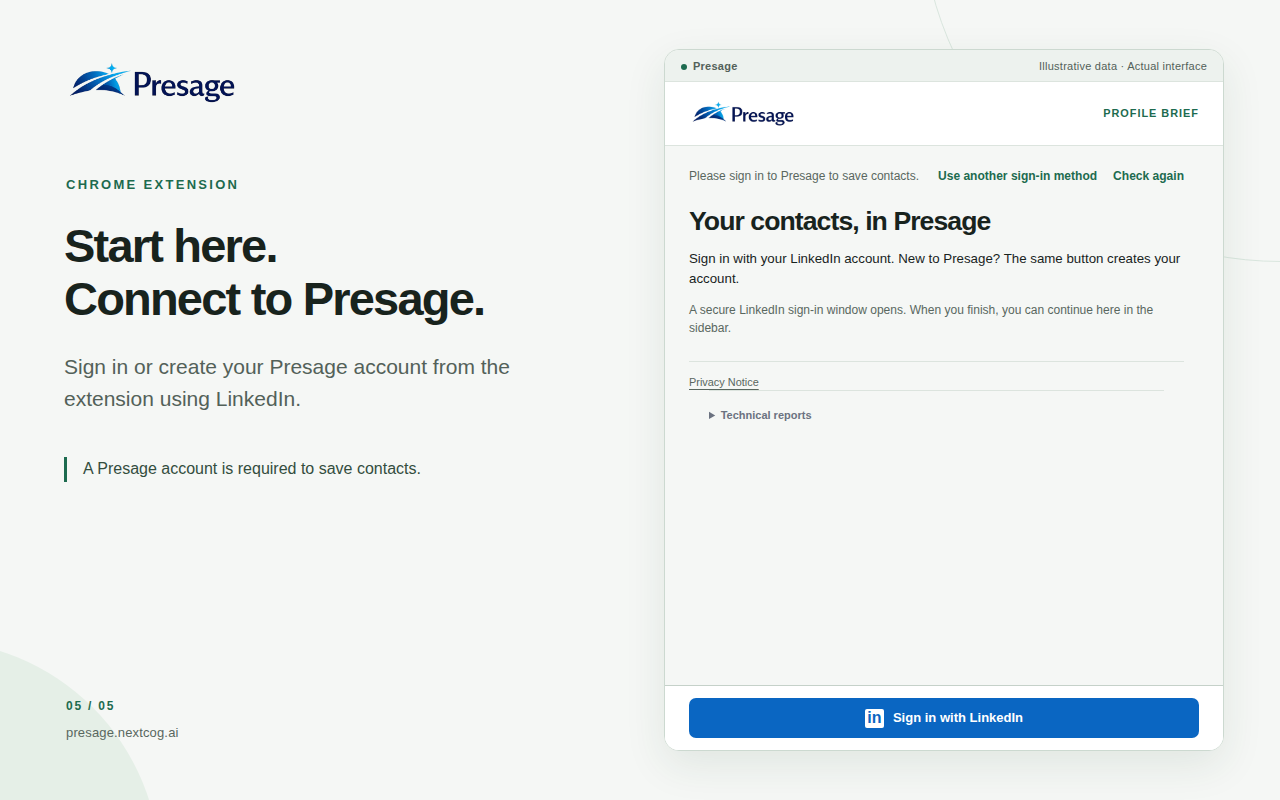
A Presage account is required. Sign in with LinkedIn from the sidebar to sign in or create your account, then accept the current terms and privacy notice. New accounts start on Basic; your plan’s permissions and usage limits apply.

Opening a LinkedIn page alone does not capture its profile or save a contact. You choose what to save or update, and protected manual fields stay unchanged.

The problem

A personalized draft is only one part of a useful campaign.

Before a relevant conversation can begin, someone has to understand the company, the contact’s role, the apparent business situation, and whether the opportunity fits. That information is often distributed across a spreadsheet, company pages, public professional profiles, and search results.

Manual research is slow to repeat, while a generic pitch ignores why the offer matters to this company. After delivery, clicks and replies often sit in separate systems, leaving the team to reconstruct context before it can follow up.

Presage connects those stages: structured research, a reusable campaign playbook, evidence-backed personalization, controlled delivery, engagement intelligence, and a next action that a person can review.

How Presage works

One connected journey from research to follow-up.

Four stages keep campaign context, personalization, engagement, and human judgment connected.

  1. 01

    Research

    Import prospects or review and save a LinkedIn profile with the Chrome extension, then turn public company and contact information into structured business context and qualification signals.

  2. 02

    Build the playbook

    Define the campaign objective, audience, offer, desired outcome, message policy, and the approved positioning Presage should apply.

  3. 03

    Personalize

    Generate reviewable messages adapted to each prospect, using relevant company context and approved technology signals when enabled.

  4. 04

    Act on engagement

    See qualifying clicks and supported inbound replies in campaign context, understand apparent intent, and review the most appropriate follow-up.

Capabilities by outcome

A campaign system, not a message generator.

Each capability supports a practical decision before, during, or after outreach.

Research and context

Build a usable account picture before deciding what to say.

  • Contact import and updatesImport CSV records or eligible LinkedIn connections with explicit authorization, or review and save individual profiles with the Chrome extension.
  • Public business researchOrganize contact, company, and source-backed context in one record.
  • Qualification signalsRecord fit, uncertainty, and evidence for human review.

Campaign strategy and personalization

Give the campaign a repeatable position while adapting each draft to the prospect.

  • Campaign PlaybooksConnect the objective, audience, offer, desired outcome, and message policy.
  • Technology positioningUse approved technology evidence and a reviewed relationship strategy.
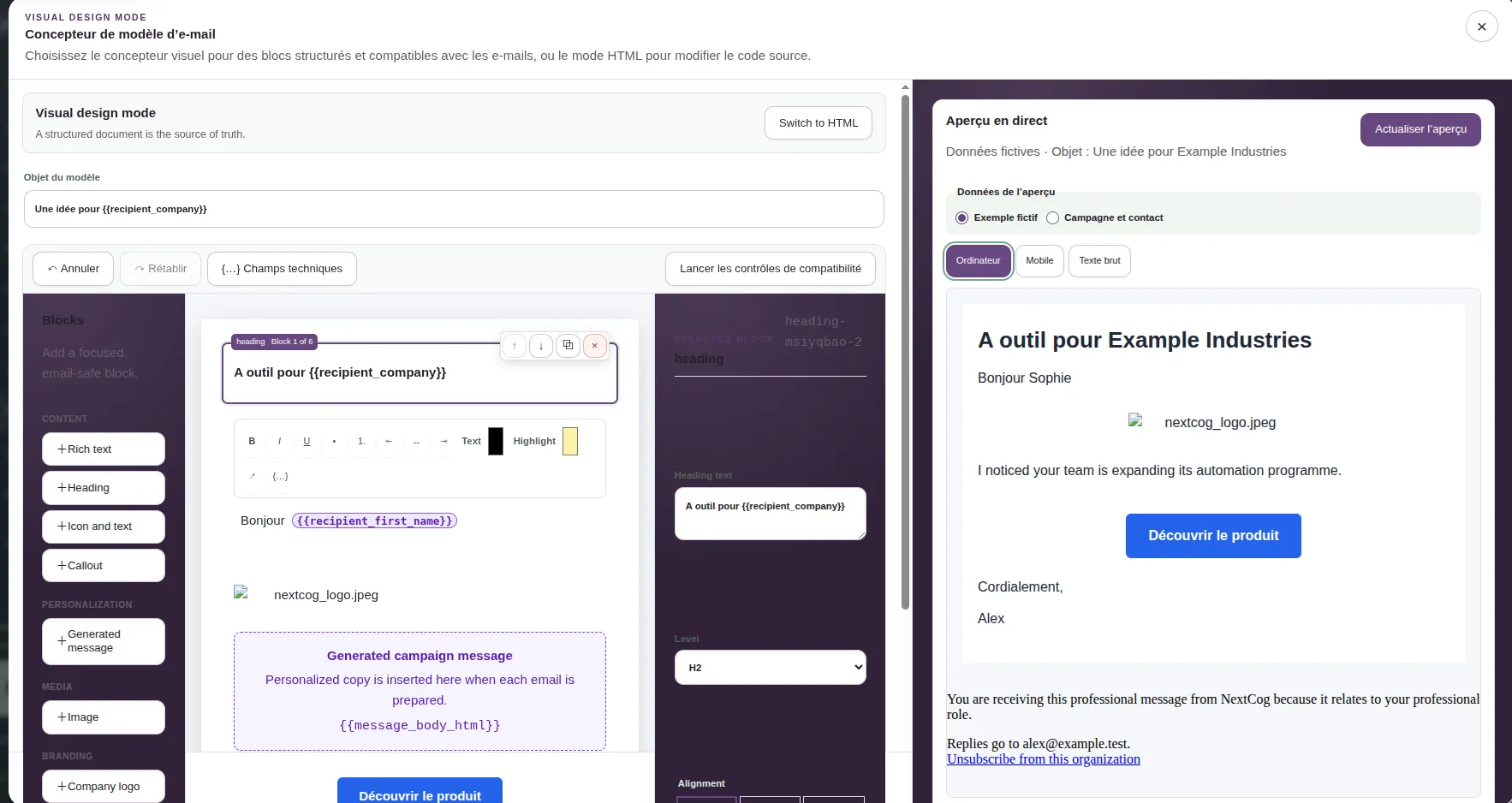
  • Reviewable draftsEdit and approve personalized email or eligible LinkedIn drafts before use.

Engagement intelligence

Read engagement in campaign context without treating one signal as certainty.

  • Recipient-level clicksSee which campaign message and contact produced a qualifying link signal.
  • Reply capture and analysisAssociate supported replies, summarize them, classify apparent intent, and estimate interest.
  • Priority and next actionSurface conversations needing attention and suggest a response, call, later follow-up, or stop.

Campaign operations

Move deliberately from approved content to delivery and follow-up.

  • Email templates and deliveryPrepare immutable message snapshots and send approved emails through supported providers on eligible plans.
  • Campaign analyticsReview delivery, click, reply, positive-reply, and attention metrics that the application records.
  • Follow-up workflowCreate review tasks and drafts, save a detected phone number, or prepare a call task without autonomous calling.

LinkedIn data import

Bring your eligible LinkedIn connections into Presage.

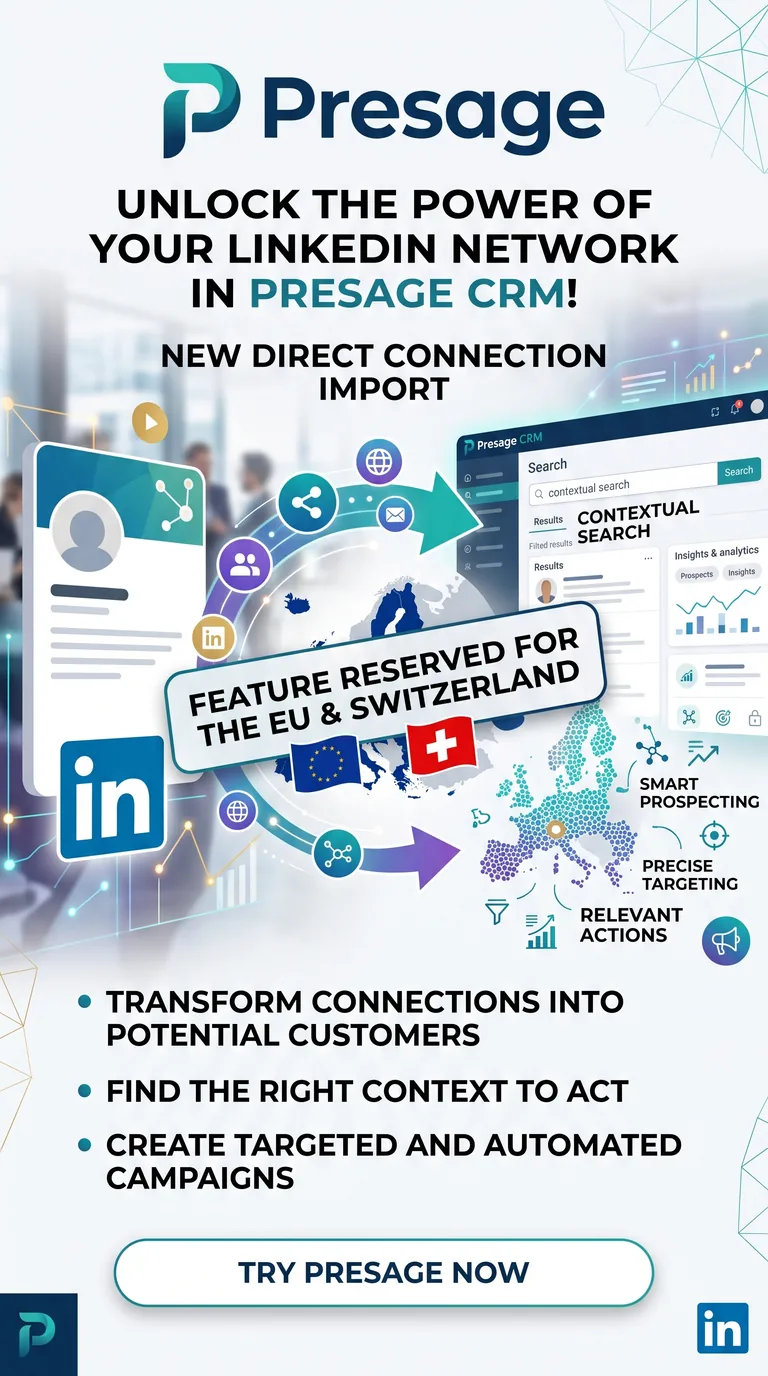
An authenticated Presage user can choose a direct LinkedIn data import, grant separate explicit authorization, and bring eligible LinkedIn Member Data Portability connections into the same proven contact importer used by Presage.

Presage illustration announcing direct LinkedIn connection import for eligible users in the European Union and Switzerland
Product illustration. LinkedIn portability availability and returned fields are determined by LinkedIn.

Availability: Eligibility, supported regions, connection fields, and data availability depend on LinkedIn’s current Member Data Portability policies and the data LinkedIn returns for your account.

From portability data to Presage Contacts

  1. 01

    LinkedIn Member Data Portability

    Presage receives eligible connection data after the user’s explicit authorization.

  2. 02

    NormalizedContact

    Available fields are mapped into Presage’s consistent contact format.

  3. 03

    Existing Presage importer

    Normalized records enter the same established import workflow as other contacts.

  4. 04

    Duplicate detection

    Existing records are identified before new contacts are created.

  5. 05

    Quota engine

    The import is checked against the workspace’s applicable allowance.

  6. 06

    Background import

    Eligible records are processed asynchronously without blocking the workspace.

  7. 07

    Presage Contacts

    Imported connections become contacts ready for the existing CRM workflow.

Illustrative example

A useful record, not another pile of tabs.

Each lead record brings identity, business context, relevance, sources, and next-step thinking into one reviewable place.

Illustrative lead profile

Elena Martin

Operations Director · Northstar Industrial Systems

Research completeReady for human review
RoleOperations Director
OrganizationNorthstar Industrial Systems
IndustryIndustrial automation
LocationLyon, France
Company summary

Specialist manufacturer supporting warehouse automation and industrial operations across Western Europe. Public company materials indicate an emphasis on operational reliability and regional delivery capacity.

Relevant business signals
  • Recent public hiring activity in operations and implementation roles.
  • Company materials describe expansion into additional European markets.
  • Operational consistency appears central to the organization’s positioning.

Campaign strategy and delivery

Move from evidence to outreach without giving up control.

Presage connects campaign strategy, contact selection, personalized drafts, approval, templates, and delivery status in one workspace. Creating a campaign or generating a draft never sends a message.

Campaigns on every plan

Connect an approved product or service to the exact context Presage needs for focused outreach.

  • Set a specific objective, target audience, offer, recipient problem, and desired outcome.
  • Choose the research policy, tone, call to action, language, constraints, and personalization mode.
  • Select contacts, generate evidence-backed drafts, and track each message from generation through approval.
  • Review and edit campaign drafts without configuring email delivery.
Connect your preferred email API

Use the provider that already fits your stack and keep delivery credentials under your organization’s control.

  • Resend
  • SendGrid
  • Mailgun
  • Postmark
  • Amazon SES
  • Brevo
  • Mailjet
Visible delivery states
  • Queued
  • Sending
  • Accepted
  • Delivered
  • Delayed
  • Bounced
  • Complained
  • Suppressed
  • Failed
  • Sending limits and suppression rules are enforced.
  • Every email includes an organization-scoped unsubscribe link.
  • Automatic open tracking stays disabled; first-party click tracking is opt-in for each campaign.
  • Supported inbound replies can be connected to their campaign when an operational reply gateway is configured; LinkedIn replies and Sent folders are not presented as synchronized.

Technology-aware personalization

Make the technology signal useful.

Knowing that a company uses Angular, Salesforce, SAP, or another technology is not enough. Presage combines approved evidence with your offer and campaign playbook to decide why the signal is relevant: complement the stack, support an integration or migration, improve it, present an alternative, or offer specialist consulting.

Technology personalization is off by default. A user reviews and approves the positioning playbook, and Presage omits the reference when no safe, relevant match exists.

Two offers, the same disciplined logic.

Signal
Uses Angular
Campaign offer
Angular consulting
Positioning
Help the engineering team modernize, improve maintainability, or accelerate delivery.
Signal
Uses Salesforce
Campaign offer
Complementary SaaS
Positioning
Explain how the product can integrate with or improve the existing workflow.

Examples use generic, fictional campaign context and do not imply partnerships with technology vendors or personal use by an individual contact.

From evidence to a starting point

Prepare outreach that has a reason to exist.

The campaign draft connects the prospect’s context with a relevant conversation angle. Generation never sends it automatically, and every message remains editable until approval.

  • Built from the reviewed lead record.
  • Editable before approval or use.
  • Kept with the research history for context.
Outreach preparation

Draft for Elena Martin

Human review required
Grounded in reviewed contextRegional growth · Operations consistency · Implementation capacity
SubjectOperational consistency as Northstar expandsMessage draft

Hi Elena,

I noticed Northstar’s public focus on reliable industrial operations and its continued regional growth. Teams at that stage often need to keep delivery workflows consistent as implementation activity expands…

Suggested next paragraph remains editable.

Explicit approval required

Engagement intelligence

NEW

Know what happened after send.

Presage connects eligible link clicks and supported inbound replies to the correct contact, message, and campaign. It helps teams interpret the signal, prioritize attention, and prepare the next action for human review.

A click is an engagement signal, not proof of purchase intent. Presage classifies likely-human, unknown, and suspected automated link requests conservatively. Reply analysis is decision support and can be corrected by the user.

  1. Approved message sent
  2. Click or reply captured
  3. Contact and campaign matched
  4. Signal put in context
  5. Next action reviewed
Illustrative interfaceCampaign reply
Alex MartinApexGrid · Operations
Campaign
European Operations
Original outreach
Improving regional delivery consistency
“This looks relevant. Could you send pricing details? You can also call me tomorrow on +33 1 23 45 67 89.”
Intent
Pricing request
Estimated interest
4 out of 5
Confidence
High

The prospect requested pricing information and is open to a follow-up conversation.

AI-assisted estimate. The user can correct the classification and score.
Phone number detected+33 1 23 45 67 89
  • Call
  • Save to contact
  • Create call task
Suggested next stepPrepare pricing information and offer a short call.
  • Prepare reply
  • Mark reviewed

Turn activity into usable follow-up signals.

01

Recipient-level click context

See which contact and campaign message produced a click, which link was involved, and when the signal occurred.

02

Conservative click classification

Separate likely-human, unknown, and suspected automated link requests instead of treating every request as buying intent.

03

Reply capture and context

Associate supported inbound email replies with the contact, campaign, original message, and conversation thread.

04

Reply analysis

Summarize a genuine reply, identify questions or objections, classify apparent intent, and estimate interest for review.

05

Contact actions

Surface phone numbers found in replies or signatures, then start a call, save the number, or create a call task.

06

Reviewable follow-up

Create tasks or personalized follow-up drafts, pause unsuitable sequences, and keep sending subject to human approval.

Signal to next action

Let the playbook prepare—not decide—the follow-up.

Approved engagement rules can coordinate a safe next step while the user keeps control of the outcome and every message.

Measure signals that support a decision.

Available campaign metrics—no invented customer results.

Click activity
Total + unique
Click quality
Likely human + unknown
Reply outcomes
Human + positive
Follow-up queue
Needs attention

Keep the conversation moving without losing control.

  • Respond faster to meaningful engagement.
  • Prevent positive replies from getting lost.
  • Avoid inappropriate automated follow-ups.
  • Keep every next action visible.
  • Prioritize the conversations most likely to matter.
  • Measure outcomes beyond delivery totals.

Before and after

Keep the campaign from fragmenting after the first draft.

Presage carries useful context through strategy, delivery, engagement, and the next human decision.

Without Presage

  • Research each contact manually across separate tabs.
  • Reuse the same generic pitch across different accounts.
  • Inspect delivery, clicks, and replies in separate systems.
  • Manually associate a response with the original campaign.
  • Choose follow-up without structured signals or shared context.

With Presage

  • Build on structured prospect and company research.
  • Apply a reusable, reviewed campaign playbook.
  • Adapt the business argument to relevant company and technology signals.
  • See eligible engagement beside the contact and campaign.
  • Prioritize a reviewable next action while keeping human judgment visible.

Built for focused B2B work

Useful wherever research quality shapes the conversation.

The product fits teams that work with considered account lists and need context before contact—not high-volume, indiscriminate messaging.

01

B2B founders

Research a focused account list before founder-led outreach or discovery calls.

02

Independent consultants

Understand a prospect’s situation before proposing a useful and credible conversation.

03

Sales and business development teams

Apply a consistent research standard across lead lists while keeping review with the team.

04

Specialist agencies

Prepare context-rich outreach for defined markets, roles, and service offerings.

05

Technical service providers

Connect public business signals with the operational problems their expertise can address.

Responsible use

Better research, not more noise.

Presage is designed for relevant, deliberate B2B outreach—not to maximize message volume or remove human accountability.

  • Research is based on relevant, publicly available business information.
  • Users remain responsible for checking the accuracy and relevance of the record.
  • Campaign creation and draft generation never send a message automatically.
  • Every campaign email requires an approved draft, a recipient review, and explicit send confirmation.
  • Sending limits, suppressions, and organization-scoped unsubscribe links apply to email delivery.
  • Use must follow applicable laws, data protection duties, and platform terms.

Questions, answered

What to know before you start.

Presage supports a deliberate preparation workflow. These answers clarify its role and boundaries.

What is a Campaign Playbook?

It is the reviewed strategy Presage applies to a campaign: its objective, audience, offer, desired outcome, research and message policies, plus approved positioning rules. It gives the campaign a repeatable direction while each draft still adapts to the individual prospect.

What is technology-aware personalization?

When enabled, Presage can combine verified technology evidence with the campaign offer and an approved playbook. The result is a relevant business angle—such as a complement, integration, migration, optimization, alternative, or consulting need—not a superficial insertion of a product name.

Can Presage support services as well as software?

Yes. Campaign offers and technology-positioning rules can describe a SaaS product or a professional service such as consulting, implementation, integration, migration, modernization, or training.

Does Presage automatically send every generated message?

No. Campaign and click-triggered follow-ups are created as drafts. Users can edit and approve them, review the exact recipient and prepared message, and explicitly confirm an eligible email send. Reply drafts also remain editable and require a user action to send.

What does click tracking tell me?

Opt-in click tracking shows eligible link requests by campaign, message, contact, and link. Presage reports total and qualifying unique activity and separates likely-human, unknown, and suspected automated requests. A click helps prioritize follow-up; it does not prove that someone intends to buy.

How does Presage analyze replies?

For supported inbound campaign replies, Presage separates human replies from automatic messages, summarizes the latest response, identifies apparent intent, questions or objections, estimates interest, and recommends a next step. Users can correct the classification and score; the analysis does not replace judgment.

Which reply providers are supported?

Presage includes a built-in Resend inbound adapter. A configured provider-neutral email API or SMTP/MTA bridge can also deliver messages into the same reply workflow. Reply tracking is available only when the workspace’s inbound gateway is operational.

Which email delivery APIs can I connect?

Presage supports Resend, SendGrid, Mailgun, Postmark, Amazon SES, Brevo, and Mailjet for campaign email delivery. Provider capabilities for delivery events, inbound receiving, and custom Reply-To addresses are reported separately.

Does Presage replace a CRM?

Presage provides contact, research, campaign, delivery, and engagement workflows, but it is not presented as a replacement for every CRM function. It can complement a broader customer system while focusing on researched B2B outreach and follow-up.

Can I import contacts from CSV or LinkedIn?

Yes. Presage accepts structured imports such as CSV and can import eligible LinkedIn connections through Member Data Portability after a separate, explicit authorization. Imported records pass through normalization, duplicate, quota, and background-processing checks.

How do I save or update a LinkedIn profile with the Chrome extension?

Preview the available profile information in the Presage sidebar and correct basic details before saving. If the contact already exists, compare existing and incoming values and choose which differences to replace. Protected manual fields stay unchanged. You can then open the saved contact directly in Presage.

Does the extension need an account, and does it capture profiles automatically?

A Presage account and a LinkedIn session in the same browser are required. Sign in or create your Presage account with LinkedIn from the sidebar. New accounts start on Basic, and your plan’s permissions and usage limits apply. Opening a LinkedIn page alone does not capture a profile or save a contact; you decide when to preview and what to save.

Which campaign metrics are available?

The workspace exposes delivery states; total, qualifying unique, likely-human, and suspected automated click activity; human and unique replies; positive and high-interest replies; reply rates; and conversations needing attention. Exact availability depends on enabled tracking and reliable delivery data.

How should engagement data be used?

Use it as decision-support context and follow your organization’s communication, privacy, and data-protection obligations. Presage does not claim that click classification or reply interpretation is infallible.


Turn campaign context into the right next action.

Research prospects, apply a repeatable playbook, personalize the business argument, and act on engagement without handing over human judgment.